Appearance
Additional Actions
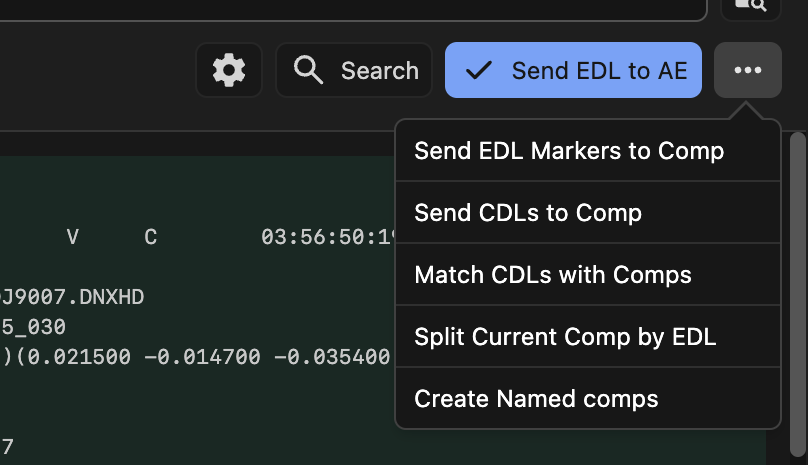
EDL Importer includes five powerful additional actions accessible from the three-dot menu in the extension panel. These actions provide advanced workflows for working with EDL data in After Effects.
Send EDL Markers to Comp
Imports EDL markers and applies them to all active layers in your composition at the specified timecodes.
How it works:
- Activate the composition where you want to add markers
- The action reads marker data (locators) from the EDL events
- Markers are added to all layers that are active at the marker's timecode
- Each marker inherits the comment text from the EDL locator data
Send CDLs to Comp
Applies Color Decision List (CDL) color correction data from the EDL to your composition as adjustment layers.
How it works:
- Activate the composition where you want to apply CDLs
- The action reads CDL data from EDL events
- Creates CDL adjustment layers that span the duration of each EDL event
- Each CDL layer is positioned at the correct timecode with the proper duration
Match CDLs with Comps
Intelligently pairs CDL data from the EDL with existing compositions in your project based on name matching.
How it works:
- Scans all compositions in your After Effects project
- Attempts to match each comp with CDL data from the EDL using multiple criteria:
- Comp name matches CDL name
- Comp name matches source file name
- Comp name matches clip name
- Any layer name or source in the comp matches source file or clip name
- Adds matching CDLs as adjustment layers spanning the entire comp duration
- Skips compositions that already have CDL layers applied
Split Current Comp by EDL
Duplicates the bottom layer of a composition and trims each duplicate according to EDL edit points, creating a split edit sequence.
How it works:
- Selects the bottom layer in the active composition
- For each EDL event with record in/out times:
- Duplicates the bottom layer
- Sets the duplicate's in point to the EDL event's record in time
- Sets the duplicate's out point to the EDL event's record out time
- If the event contains a marker/locator, the layer is renamed with the marker comment and a marker is added
- Removes the original bottom layer after all splits are created
TIP
If no edits are created, the action will detect the mismatch and offer to automatically adjust your comp's start timecode to match the first EDL event.
Create Named Comps
Pre-composes each layer in the active composition individually, using intelligent naming based on markers or layer names.
How it works:
- For each layer in the active composition, the action:
- Checks for a marker at the layer's in point
- If a marker exists at the in point, uses the marker comment as the precomp name
- If no marker exists but the layer name differs from its source name, uses the layer name
- Otherwise, appends " Precomp" to the layer name
- Creates a precomp with the in/out point duration of the original layer
- Sets the precomp's timecode to match the parent comp's timecode at the layer's in point
- Places the precomp in the same folder as the parent composition
Usage:
- Ideal for converting an EDL-based sequence into individual nested compositions
- Automatically generates meaningful names from markers or layer names
- Perfect workflow after using "Split Current Comp by EDL" with markers
- Each resulting precomp maintains its original timing and duration
Example Workflow:
- Use "Split Current Comp by EDL" to create split layers with marker-based names
- Use "Create Named Comps" to convert each split into an individual precomp
- Result: Each clip from the EDL becomes a separate named composition
Tips and Best Practices
Timecode Alignment: Many actions depend on matching timecodes between your EDL and compositions. The extension will offer to adjust comp timecodes automatically when mismatches are detected.
CDL Workflows: For CDL actions, install the fnord software CDL plugin before attempting to use these features.